We moved !!
Join us at the new host site
I am hosting my own site and blog now. It has been my desire to create a site that has better content, news, information and benefit to the Autodesk Design and Manufacturing community. More storage and flexibility was required. This site will be discontinued over time.
The new Blog “Design and Motion” can be found here:
http://designandmotion.net/blog
The main site will be developed as time progresses
Please follow me on the new twitter address:
http://twitter.com/johnevansdesign
Civil 3D – Stop using context menu for Major Style Edits
This option costs me SOOOOO much time every day. Well, that and not saving valuable changes to my template. So in tune with James’ famous PLEASE STOP posts, I’ll post some of my own now and then, mostly for my own sake. Perhaps I’ll save a few of you some frustration.

Editing a style by selection through a Right Click Context menu is such a cool, convenient option, right. So much so, that faced with a large amount of style tuning, I’ll pick it anyhow. JUST STOP!! Break the habit.
Why?
Here’s the thing. It all revolves around this magic button.

Japan – Feb. 28 Phrase of the Day
二月二十八日
Sukii tte ikkai yattara yamitsuki ni naru
Once you try skiing, You’re hooked.
スキーって一回やったら病みつきになる
Today’s focus will be on ‘yamitsuki ni naru’
Yamitsuki means hooked; ni naru means to become.
Repeat this over and over all day. My boys will work with it until they can repeat it on queue. Remember these are such a useful supplement. They helped me a lot.
Bonus study. Can anyone figure out what this kana word is? Can you replace it in out study sentence?
インベンター Inbentaa
Civil 3D – 3D Laser Webcast
 Autodesk sent out invitations to a webcast Thursday, February 25, 2010, presenting the first in a 3-part series discussing laser scanning technologies for infrastructure projects. The 1 Hr event kicks off at 10:00 hrs PST.
- Laser scanning technologies available
- industry perceptions
- various point cloud topics

Civil 3D – Google Earth export
 Everything in the world seems to point into Google Earth. The problem is that we receive GE KML files coming and going. Client’s send them to us, we send them to crews, we send them to clients and contractors. Generally these get sent to everyone.
I found that everyone seems to have converters for Google Map to Google Earth, Excel to GE, ESRI SHP to GE, you name it. I bet my wife has something that will export one of her Facebook games to GE.
I figured there were numerous options when my VP asked for something to export a KML file to ascii LAT/LON, or even to UTM/SP Grid. I think he’ll take it any way he can get it. I know he’s looking at ME to write it in .NET, but my working with Tekni takes all my personal time, so I need to head this off quickly.
“You know it will cost you more for me to code and debug it, than if we outsourced it. “ I said, “But I know a guy who’ll do it for next to nothing”. Yeah… the look I was getting said he wasn’t too hip on paying anything beyond my salary. “Ok ok, let me go online and try to find something, then we’ll talk about outsourcing”.
After searching the wrong keywords (google and Excel) for half an hour, I found this under “KML to CSV”:
http://freegeographytools.com/2009/online-kml-to-shapefile-converter
These folks have a slough of data outputs. You can Import the file, or paste the KML string. It’s online PHP, and convenient. The output formatting is a bit caste, but very little rework will be needed. It’s free, and there are many options, as well as other programs.
It got me off the hook, and it might help you.
As for using GE with Civil, I still have not seen the scaling fix yet.
Civil 3D – Label Expressions
Check out my latest article “A quick fix with Label Expressions” on Civil 3D.com
http://www.civil3d.com/2010/02/a-quick-fix-with-label-expressions/
Civil 3D – Lone Parcel Segment Site
Parcels are composed of Parcel Segments. These are created when the Parcel was defined. They however can be estranged for various reasons, including half of the parcel was erased.
We always (at least I hope always) work from the larger parcel inward to a smaller division. I have gone so far as to create a huge overall parcel in the background to help me when I knew the developer would add some land to the design later. I have a few of those that would guarantee that nothing will change later. It always changes.
Say for example you have a small Parcel isolated within a big Parcel. Erase one of the sides to the smaller Parcel, and the contents bleed out to the larger one. No problem. However the remaining sides (Parcel Segments) of the isolated parcel are still there.
The important thing to remember is that these belong to a Site. If you check the Segments, they are tagged accordingly.

I was cleaning up my design, and needed 2 things:
- to get rid of empty sites
- to remove land from the design and send it to the plat to the East.

This Site was empty, so I erased it. Subsequently I erased the Parcel Segment I planned to work with. Undo!!
The solution was to move the segment to the appropriate site.

Use the context sensitive Ribbon Panel. I do love the Ribbon.
Once moved the Parcel automatically joins in with the others, and we change the style to match the adjacent plat.

This could not have gone better. One of the keys to making Civil 3D fun is effective organization of your Sites and styles. Amazingly cool.
Civil 3D – Error Code 21 and User Rights
Last week a new student contacted me regarding an educational install of AutoCAD, and an odd error code that did not bring much from Google. On first run, this error flags and shuts them down.
Unable to Initialize ADLM – Internal Error Message Error Code <21>
After some research I came up empty, except that some other folks had similar issues, but no one commented. So I suggested the “reinstall option” and checking the user rights.
User rights was the ticket. Make sure your user account has sufficient rights to ADLM, file and template structures, and any the Program Data file locations.
Inventor – the Virtual Reality Blog
 Wasim Younis has a new Blog site titled “Virtual Reality”.
http://vdssolutions.wordpress.com/
Wasim wrote the book “Up and Running with Autodesk Inventor Simulation”, and has proven to be an informative look at numerous points throughout the simulation process. I plan to promote the book with some chapter reviews and a book giveaway as well.
The site is brand new so go check him out. If we can extend some attention his way, perhaps he’ll keep the simulation tips coming.
Not just another Space Pilot Review
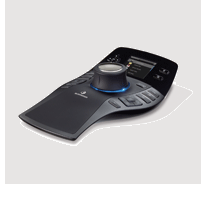 3D Connexion released the newest creation in their line 3D navigation tools, the Space Pilot Pro. I have always been fascinated by 3D Connexion’s tools, as they clearly are unique items. However I kept them at a distance because of a few factors: Price, Uneasiness, and Dependency.
If I can’t have it, I usually won’t go play with it. This keeps my marriage in tact as well.
Price – I believe that at least 50% of the users out there know something about these devices, and know they are fairly expensive. Well, this is partially true. If you get in at sale time, you can pickup a notebook model for 80 USD. I don’t think there are any buttons, just view mobility. That’s still a nice item for 80 bucks. The new deluxe model comes in at 500 USD. That’s pricey.
Uneasiness – Mostly my innate lack of desire to change something that works; namely the way I have been doing it. The 3 button mouse and an ALT key covers a lot of ground. I watched some field experts navigate quite well with a 3 button mouse, and there was no lack of speed. Which brings us to the last item.
Dependency – Ever since Vibrant Graphics dumped us old people, I have been very jaded about dependency on non-OEM functionality. I still wrote C++/C# code, but usually this was to cover things that were reasonably impossible with other methods. No odd command aliases, no large menu configurations, mostly out of the box. This way I would never be bent over the way I was in 2000, when I had to relearn the interface.
AU2009
These 3D mice have always been super-popular at AU. So I decided to do a few 3D Connexion promotions for the upcoming Tekni Creative Inventor training, and the powers that be agreed to pay for the mice. I however was not one of the lucky ones that will get said mice.
The curiosity was killing me. While I’d like to try it in Inventor, my question is how will it work in Civil?
So my associates introduced me to some people at 3D Connexion, and Walt and Company, and they kindly agreed to let me play with one of the new toys. During the last discussion, they asked what I intended to do with it, and I told them I intended to review the product in different environments, and then publish the results. A few days later a new Space Pilot Pro ended up on my door step. Like a kid in a candy shop.
The Box
 I told my boys, “That’s Daddy’s, get away!” I threw in the universally understood word: “Mine!”. They reluctantly backed off. I told my youngest, “It’s not food, go away”.
What came in the box was a folder from the company, containing some fact sheets, Company Rep contact info, the driver CD, and the Space Pilot Pro….and a note that said basically “If you need any assistance, please call.”
Author
Welcome. ようこそ。
AU 2010! Yeah, well I’m back and already looking forward to next year.
I won the Inventor 2011 Beta Contests for Simulation. Now I’m back to pounding out courseware again.
Don’t forget the supportive folks at Autodesk University, Autodesk Certifications, Civil3d.com, BIM on the Rocks, and Tekni.
I took on some design contracts this past year, and things went quite well. If you need a design put on paper, or a problem worked out, let me know.
If you want to see something, please post to the Civil3D or Inventor product pages. I will continue do my best. みんあさんがんばれ。
John Evans

Fun in Kanazawa with my nephew Shido !
My name is John Evans, and I am an Autodesk Inventor and Civil 3D Certified Professional. I currently work for Gustin, Cothern, and Tucker, Inc., a Civil Engineering firm in Niceville, Florida. There I manage the Civil 3D seats, training, troubleshooting, construction data management, and occasionally programming. I provide consulting services for product design, and serve as a consulting author at Tekni Consulting, where I write content for Inventor training courses. I attended Autodesk University 2006, 2007, and 2009 in Las Vegas.
I am a veteran with extensive experience in Aerospace maintenance, Mechanical engineering and manufacturing, and Civil Engineering/Surveying, both field and office, and I speak English and Japanese. When I am not answering questions here, I am with my family, writing training material, proving a new design, studying Japanese, or in my machine shop.
I Currently use AutoCAD Civil 3D 2010, Autodesk Inventor 2010, MasterCAM X2, InventorCAM, and Mach3.
If I could do more of something besides blogging to everyone, it would probably be…
At Autodesk University!!!!!
with loving wife and her monster Nikon while I watch my kids, spending time with my Japanese Friends, in Japan, Cutting parts in my machine shop, Playing poker, Swinging a sword in Kenjustu class, spending time with my 2 best friends Jamie and Jason, and learning something new.
"In God We Trust"… Secretary of the Treasury Salmon P. Chase
“It’s not that I’m so smart, it’s just that I stay with problems longer”…Albert Einstein
“Any man who can drive safely while kissing a pretty girl is simply not giving the kiss the attention it deserves”…Albert Einstein
“Honor isn’t about making the right choices. It’s about dealing with the consequences” … Midori Koto
 Autodesk Civil3D support
- An error has occurred; the feed is probably down. Try again later.
-
Archives
- March 2010 (2)
- February 2010 (5)
- January 2010 (5)
- December 2009 (3)
- November 2009 (5)
- October 2009 (8)
- September 2009 (11)
- August 2009 (5)
- July 2009 (4)
- June 2009 (4)
- May 2009 (4)
- April 2009 (7)
-
Categories
-
RSS
Entries RSS
Comments RSS
 from Civil to Inventor